Migrating a Regulated UK Care Management SaaS Platform to Azure: A Cutover Retrospective
TL;DR
- We moved a UK care management platform from a private hosting provider to Azure UK South.
- Cutover ran in a planned early-morning window on Wednesday 14 October. Two databases fell behind on sync, so go-live moved from 08:00 to 10:30.
- Most of the work happened before the night. Azure ran in parallel, and the data was already syncing.
- Key lessons: size from what production actually uses, rehearse everything, keep code as the source of truth.
Context
The platform is a Java-based SaaS product used by care providers across the UK. It operates in a regulated healthcare environment, and the hosting contract was ending. Hard deadline.
Scale: roughly 60k unique visitors and 50M+ requests a week, around 1 TB of traffic.
My scope: the VM fleet and app stack (Tomcat, OpenJDK, Apache, TLS), OpenLDAP, Azure Managed Redis, configuring and running the Azure DMS migrations, Ansible automation, and running the cutover.
Target architecture
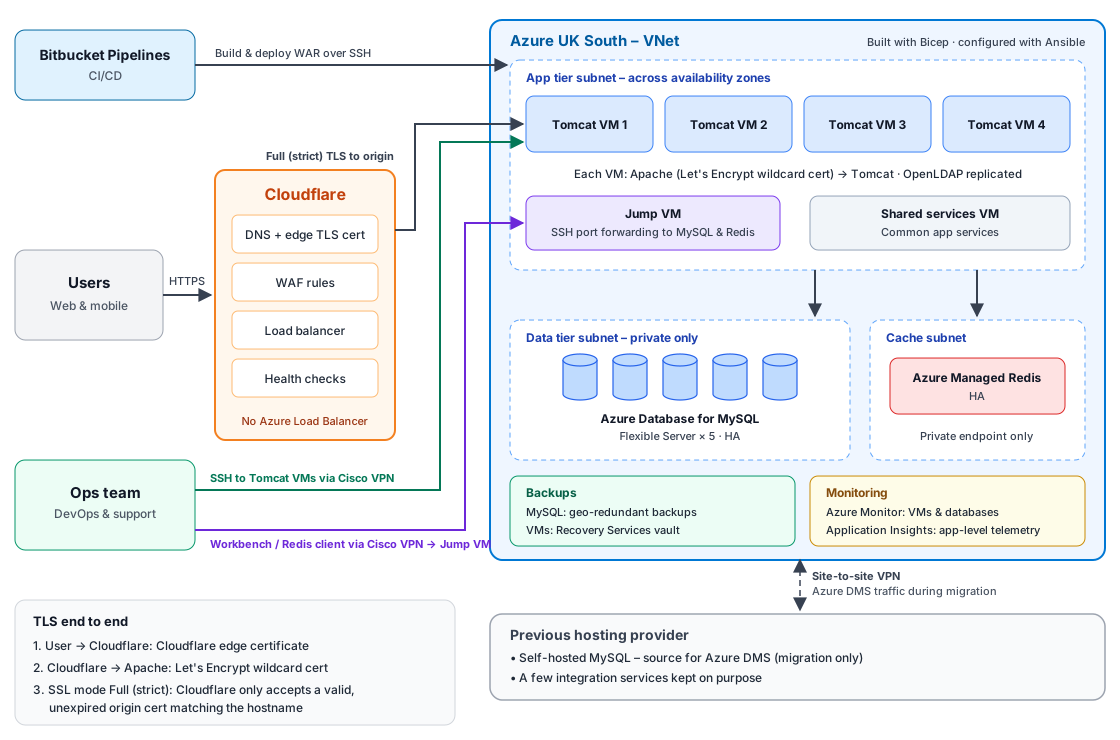
- Edge: Cloudflare for DNS, WAF, load balancing and health checks (already in place from an earlier load balancer migration). There's no Azure Load Balancer; Cloudflare sends traffic straight to the Tomcat VMs.
- TLS end to end: Cloudflare's edge certificate for users, then a Let's Encrypt wildcard certificate on Apache at the origin. SSL mode is Full (strict), so Cloudflare only accepts a valid, unexpired origin certificate that matches the hostname.
- App tier: AlmaLinux 9 VMs throughout. Four Tomcat VMs across availability zones, each running Apache, Tomcat and a replicated OpenLDAP node, plus a shared services VM and a jump VM.
- Data tier: twelve self-managed MySQL servers consolidated into five Azure Database for MySQL Flexible Server instances, all HA. Nine customer servers holding over 850 tenant schemas are now grouped by customer category on three Memory Optimized servers. The demo, archive and common database servers moved to the remaining two instances.
- Cache and sessions: Azure Managed Redis, HA, behind a private endpoint. It stores the Java app's user sessions, so if a Tomcat VM goes offline, users carry on from another VM without being logged out. Only resources inside the VNet can reach it.
- Backups: geo-redundant backups for MySQL. VMs are backed up to a Recovery Services vault.
- Deployments: Bitbucket Pipelines builds the WAR and deploys it to the Tomcat VMs over SSH.
- Ops access: DevOps and support connect over the Cisco VPN, using SSH for the Tomcat VMs and the jump VM for MySQL Workbench and Redis clients.
- Monitoring: Azure Monitor for the VMs and databases. Application Insights for app-level telemetry.
- Hybrid link: a site-to-site VPN to the old provider. It carried the database migration, and still links a few services that stayed behind.
Principles
- Infrastructure as code: Bicep with Deployment Stacks, Ansible for configuration.
- Dry run, review, apply: every change ran with
--check --difffirst. - Rehearse the risky steps: if it could fail on the night, we ran it beforehand.
Prep work
The goal: by cutover night, Azure is already a working copy of production. The night only moves the latest data and switches traffic.
Build and parallel run
All VMs were built on AlmaLinux 9. Ansible built everything on top: OpenJDK, Tomcat, Apache, TLS, OpenLDAP, file sync across the fleet, and OS hardening.
The full stack then ran alongside the old platform for a few weeks, on a test subdomain behind Cloudflare. CI/CD deployed the same code to both.
Staged configuration
All settings and application configuration files were staged on the Azure VMs ahead of time, and pushed by automation on the night. No one edited config files by hand during the cutover window, which removed a big source of human error when people are tired and working against the clock.
By go/no-go, we already knew the app worked on Azure. The only open question was whether the data would be fully up to date on the night.
Database consolidation and migration
Before: the customer data lived on nine self-hosted MySQL VMs. Over 850 tenant schemas were spread across them, mixing care home, domiciliary care and group customers on the same servers.
Consolidation: rather than lift and shift nine servers, we grouped the tenant schemas by customer category and consolidated them into three Azure Database for MySQL Flexible Server instances. The other three source servers (demo, archive and a common database) moved to the remaining two instances:
| Source | Target server |
|---|---|
| Care home customers | prod-carehome-db-01 |
| Domiciliary care customers | prod-dom-db-02 |
| Group customers | prod-group-db-03 |
| Demo | prod-demo-db-04 |
| Archive | prod-archive-db-05 |
The common database moved across alongside them.
The three customer servers run on the Memory Optimized tier, with the SKU and capacity sized for the combined load of each category. Fewer, clearly labelled servers are easier to run, monitor and audit.
Migration, in short:
- Prep work: dump the schema definitions from each source server.
- Challenge: the source databases used MySQL's native encryption at rest (keyring plugin). Flexible Server doesn't support it, so encrypted schemas failed to import.
- Steps:
- Remove the encryption clause (
ENCRYPTION='Y') from the schema dump withsed. - Create the schemas only on the target, with no data.
- Copy the data with Azure DMS as an online migration: full copy, then continuous replication, all over the site-to-site VPN.
- Remove the encryption clause (
Data synced for days before cutover. On the night, ten of the twelve source databases only needed a final sync check before we stopped DMS. The other two are covered under Challenges. Flexible Server encrypts storage by default, so encryption at rest wasn't lost; it moved to the platform.
Directory service
OpenLDAP runs as a multi-node replicated cluster across the Tomcat VMs. The data can't go anywhere until the server config exists, so the move came in two parts:
- Build the config first. Ansible set up OpenLDAP on each Azure VM ahead of time: the server configuration, schemas and replication between the nodes. The directory was ready, just empty.
- Move the data with
slapcatandslapadd. On the night,slapcatexported the directory from the old platform. We copied the export to Azure and loaded it withslapaddon each node in turn, withslapdstopped. Then replication kept the nodes in step.
The whole sequence was scripted and rehearsed, and entry counts were checked against the source every time.
Testing
QA was involved at every stage:
- Before: pre-flight and regression testing across web, mobile and the main care modules, then final UAT with the dev teams. No issues.
- During: end-to-end testing while the site was VPN-only, plus checks on every third-party integration: NHS GP records, care records exchange, clinical tools and other partners. Some run on the old platform over the VPN, so these mattered.
- After: close monitoring through hypercare as customer traffic arrived.
Challenges
Sizing against the real baseline
The first Azure VMs looked fine on paper but were well below the old servers. The JVM heap was smaller, and 30 GB OS disks were over 80% full before go-live. We scaled the VMs, matched the heap and grew disks to 128 GB.
Size from what production actually uses.
Drift under time pressure
Some fixes went in through the Portal to unblock testing: a Redis SKU change and NSG rules. One surprise: Azure Managed Redis listens on port 10000, not 6380. Every Portal change was logged and reconciled into Bicep. Drift is debt: fine to take on, as long as you write it down.
Two databases out of sync on the night
When we checked the final sync, ten databases were fully caught up. Two were not:
| Source DB (old host) | Seconds behind |
|---|---|
| Customer DB 04 | 6,587 (~1.8 hours) |
| Customer DB 05 | 28,550 (~8 hours) |
| All other 10 | 0 |
Waiting for them to catch up wasn't an option inside the window. So for those two, we stopped relying on the online sync and ran an offline copy on the night.
That was safe because nothing was writing to the old databases. The app servers and LDAP on the old platform were already stopped. A Cloudflare rule limited access to the team's VPN, so customers only saw the maintenance page.
It worked, but it took time. Go-live moved from 08:00 to 10:30. Our support and customer experience teams kept customers informed throughout. It was the one part of the night that didn't go to plan. Check replication lag the day before, and have an offline fallback ready for every database.
Switching traffic safely
The night before, I realised the plan had a flaw. Disabling the old Cloudflare load balancer would have made the login hostname stop resolving. Customers would see "site not found", not a maintenance page.
What we did instead:
- A Cloudflare WAF rule allowed only team VPN IPs. Everyone else got the maintenance page, served from the rule.
- We swapped the load balancers' names instead of disabling anything (details below).
- At go-live, we removed the production hostname from the rule. The old platform stayed reachable over VPN only.
How the name swap worked. In Cloudflare, a load balancer's name is the hostname it answers on. We had two:
| Role before cutover | Load balancer name | Pool |
|---|---|---|
| Production | Production login hostname | Old platform servers |
| Parallel run | Test subdomain | Azure Tomcat VMs |
During the window, with the VPN-only rule already in place:
- Rename the old load balancer from the production hostname to a parked "legacy" hostname. The old platform stays reachable on that name for checks and rollback.
- Rename the Azure load balancer from the test subdomain to the production hostname.
The production hostname never stopped resolving. It just pointed at a different pool, and the WAF rule kept customers on the maintenance page while we tested. Rolling back meant reversing the two renames.
Going live was one small change.
The rollback window closed at go-live. Reversing the renames was quick, but rollback was only realistic before customers came back. Up to that point, the old databases and the Azure databases were still consistent, because no customer had written anything to Azure yet. Once customers were on Azure, they'd start writing new data there. The old databases would go stale straight away, and moving that new data back would be slow and risky.
So the rule was clear: roll back only before go-live, and only if testing during the maintenance window found a critical issue. After go-live, we were committed to Azure and would fix forward.
Performance under real customer traffic
Testing on the test subdomain and on the night looked clean. The problems only appeared once real customer traffic arrived after go-live.
On the managed databases, connection limits, thread settings and timeouts didn't behave like the old self-managed servers under the same load. We saw connection and thread pressure that QA traffic had never produced. We tuned the database server parameters during hypercare until they matched how production actually behaved.
Load testing passes don't replace real traffic. Compare database settings line by line, not just CPU and RAM.
Running the cutover
Before go/no-go, I ran a walkthrough of the cutover execution plan with the CTO, the Head of Engineering and the tech team (DevOps, Dev, Product and QA). It covered three parts:
- Readiness: our point of view on whether we were ready, and the evidence behind it.
- Execution plan: every step, owner and timing for the night.
- Rollback plan: what would trigger a rollback, how we'd do it, and the point after which rollback was no longer an option.
Go/no-go was two days before. The cutover itself ran on Wednesday 14 October. Every step had an owner, a start time and a duration.
| Time (UK) | Step | Owner |
|---|---|---|
| 03:30 | Stop old app servers, disable DB events, maintenance page up | App support |
| 04:00 | Confirm final sync, stop DMS, enable DB events on Azure | DevOps |
| 04:00 | Cloudflare: VPN-only rule, swap load balancers | DevOps |
| 04:05 | Sync customer files, restore LDAP | DevOps |
| 04:15 | Push staged app config, switch datasources to Azure DBs | App support / DevOps |
| 04:50 | Start app servers on Azure, confirm access | App support |
| 05:00 | End-to-end and third-party testing | QA / Product |
| 05:30 | Testing buffer and fixes | All |
| 08:00 | Planned go-live (actual 10:30, see Challenges) | DevOps |
Two details that mattered:
- DB events off on one side, on on the other, so no jobs ran twice.
- Datasources from the source of truth: a script rewrote the per-tenant DB config for Azure from the latest copy on the old servers.
Beyond the delayed start that morning, daily traffic in Cloudflare shows no dip around cutover day. For customers, the rest of the week was business as usual.
After go-live
- Test resources removed. Test SKUs and test databases were cleared out once production was stable, for lower cost and a cleaner estate for audit.
- Support team DB access. Our second-line support team (SL2) queries production with MySQL Workbench. The databases have no public endpoint, so they connect over the Cisco VPN to a small Linux jump VM, using SSH port forwarding:
1Workbench → Cisco VPN → jump VM (SSH tunnel) → Azure Managed MySQL
Same tools for SL2. No public route to production data. The setup follows the same pattern as my MySQL Workbench SSH tunnel guide.
What I'd do differently
- Prove the hardest part first. The encryption blocker shaped the whole database plan. I'd run that proof of concept on day one.
- Match the database settings, not just the server size. We matched CPU and RAM, but settings like timeouts and connection limits differed on the managed databases. Those differences only showed up under real load after go-live.
- Point apps at DNS names, not IPs. A managed database's private IP can change. One app still used IP addresses, and that caught us on cutover day.
- List every IP-based rule before the move. Allowlists in Cloudflare, firewall rules and partner access all depend on source IPs. After go-live, one internal server was challenged by Cloudflare because its new outbound IP wasn't on the list.
What's next
- Hypercare, then decommission the old platform.
- Clear the remaining Portal-to-Bicep drift.
- Plan the next OS refresh before current support ends.
Final thoughts
The cutover wasn't perfect: two databases cost us a delayed start. No data was lost, and customers were kept informed. The real work was in the weeks before: Azure running as a live copy, data syncing early, and the risky steps rehearsed.
Write the checklist early, give every step an owner, and rehearse the risky steps before cutover day.
Found this useful? A coffee helps support more write-ups like this, and following keeps you posted on new ones — no spam.